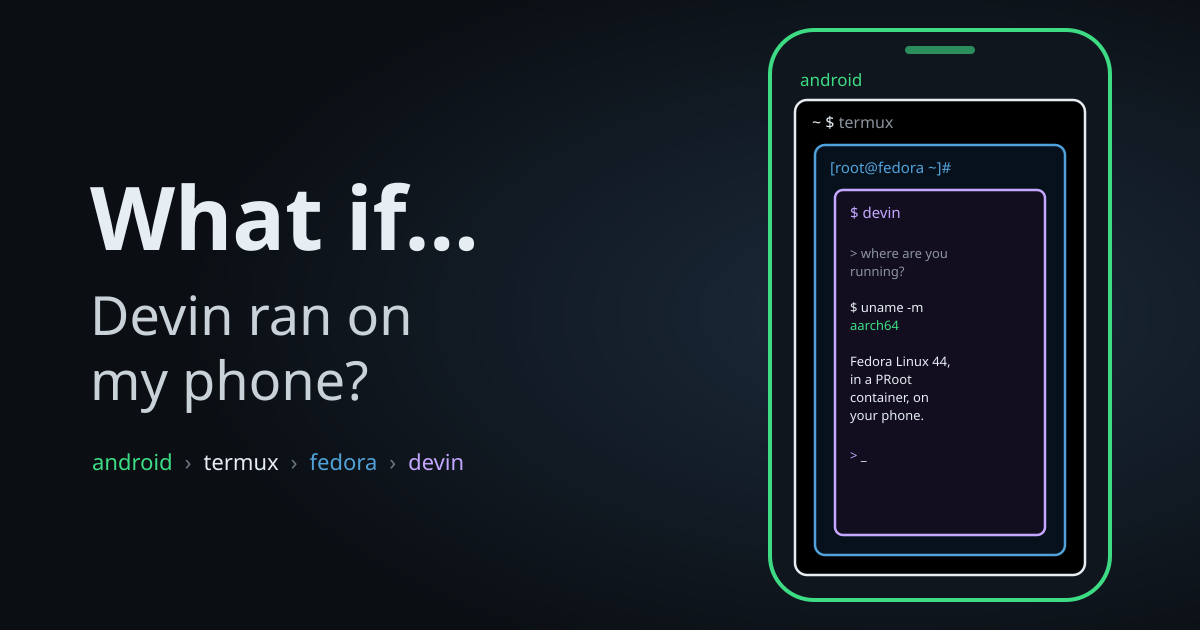
*This is the first post of a series I'm calling What If.... Small experiments that start with a slightly unreasonable question and end wherever the terminal takes me.*
The question
Coding agents are not limited to the laptop anymore.
It's common to see an agent running on a spare PC at home, or on a cloud VM, accessed over SSH or a tunnel. Even from a phone.
But in all of these setups, the phone is only a remote control. The agent runs somewhere else.
So I asked myself: what if the agent ran on the phone? No home server, no VM. Only the device in my pocket.
This is an experiment, not a recommendation. And it turned out to be a short path.
The first problem wasn't the agent, though. Coding agents are built for computers, so I had to turn my phone into one.
Termux
Android runs on the Linux kernel. There's a filesystem, processes, users and a network stack. Technically, everything a coding agent needs is already there.
What's missing is a terminal. There's no shell, no package manager and no way to curl an installer and run it.
For that, we have Termux. It's a terminal emulator for Android, with a minimal Linux environment and its own package manager. No root required.
Install the app (from F-Droid or its GitHub releases), open it and run the following command:
~ $ pkg upgrade && pkg update -yFrom here, the phone behaves like a small Linux box.
But Termux alone is not enough. It provides a shell and a set of packages built specifically for Android, not a full Linux distribution.
A coding agent expects a regular Linux, with standard paths, a standard C library and a standard package manager.
proot-distro
To solve that, Termux has proot-distro.
proot intercepts the system calls of a program and rewrites file paths on the fly. That way, a directory looks like a complete root filesystem (/) to everything running inside it.
There's no real root, no virtual machine and no emulation. Processes run natively on the phone's CPU and on Android's kernel.
proot-distro uses it to install and manage whole distributions. To install it, run in Termux:
~ $ apt install -y proot-distroRunning proot-distro install without arguments lists the available distributions. I chose Fedora:
~ $ proot-distro install fedora:latest
~ $ proot-distro login fedora
There's also a short alias, which I used later on:
pd login fedora.
After logging in, the prompt changes. Let's check where we are:
[root@localhost ~]# uname -a
Linux localhost 6.17.0-PRoot-Distro #1 SMP PREEMPT_DYNAMIC Fri, 10 Oct 2025 00:00:00 +0000 aarch64 GNU/Linux
[root@localhost ~]# cat /etc/os-release | head -5
NAME="Fedora Linux"
VERSION="44 (Container Image)"
RELEASE_TYPE=stable
ID=fedora
VERSION_ID=44Fedora 44, on an aarch64 CPU, inside a phone. With dnf, /usr/bin and everything else a regular Linux has.
Well, almost everything. There's no real init system. systemctl exists, but there's nothing for it to talk to:
[root@localhost ~]# systemctl is-system-running
offline
No systemd, no services and no dbus. This will matter in future episodes. For now it doesn't, since a coding agent CLI is just a program running in a shell.
Android is also still visible through some environment variables:
[root@localhost ~]# echo $ANDROID_ROOT
/system
[root@localhost ~]# echo $PROOT_L2S_DIR
/data/data/com.termux/files/usr/var/lib/proot-distro/containers/fedora/rootfs/.l2s
A Fedora inside a Termux directory, inside Android.
With a real distro running, the question changed from "can a phone run Linux?" to "does it run Devin?".
Devin
I expected some trouble here. There wasn't any.
First, update Fedora:
[root@localhost ~]# dnf upgrade --refresh -yThen run the same installer used on a laptop:
[root@localhost ~]# curl -fsSL https://cli.devin.ai/install.sh | bashAnd log in:
[root@localhost ~]# devin auth loginTo verify the installation, run the following commands:
[root@localhost ~]# devin --version
devin 3000.10.31 (b98cc431)
[root@localhost ~]# devin auth status
Logged in (via Devin).
Credentials:
File: /root/.local/share/devin/credentials.toml
API server: https://server.codeium.com
Devin webapp: https://app.devin.ai
Devin API: https://api.devin.ai[root@localhost ~]# devin doctor
...
1 check(s): 1 passed, 0 warning(s), 0 failure(s)Finally, the real test. Asking Devin itself where it's running, and making it check instead of guessing:
[root@localhost notes]# devin -p -- "In one short sentence: what OS and CPU architecture are you running on? Check with a command, don't guess."
I'm running on Fedora Linux 44 (a PRoot container reporting kernel 6.17.0) on an aarch64 (ARM64) CPU.
A coding agent running on my phone, and aware of it.
From here, it's a regular Linux machine. The usual tools are one dnf away:
[root@localhost ~]# dnf install git gh -y
[root@localhost ~]# gh auth login
Clone a repository, run devin inside it and start working. No home server, no VM, only the phone.
Other agents
Nothing in this setup is specific to Devin.
Once the phone runs a real Linux distro, it's an aarch64 Linux machine. So any coding agent that runs on Linux ARM64 works the same way: Claude Code, opencode, Codex CLI, Gemini CLI and so on.
Use its regular Linux installer (or npm, since Node is one dnf install nodejs away), log in and it's done.
Termux and proot-distro do the hard part, turning the phone into a computer. Which agent runs on it is up to you.
Conclusion
It works. Devin runs natively on my phone, inside a Fedora that lives inside Termux, that lives inside Android.
But the experience is not great. A coding agent in a terminal, on a 6-inch touchscreen, with a soft keyboard covering half of the output. It works, but it's not nice. Terminals were designed for keyboards and big screens, not thumbs.
Which leads to the next question: what if I didn't have to use the terminal at all? What if a real mobile app could talk to the Devin running on the same phone?
That's for the next episode of What If.... Thanks!